
MCP advice and implementation
Connect PerfChecker to a tool on an existing MCP server. PerfChecker acts as the MCP client calling your agent's tools. Discuss performance evidence in advice mode, then explicitly request implementation after reviewing the answer. PerfChecker's deterministic findings remain available without an agent or network connection.
MCP is a tool protocol, not a model endpoint. The chosen tool must accept a prompt and produce an answer, directly or through its own agent. A server exposing only unrelated data tools cannot generate performance advice. For an external server, you manage its installation and startup. The VS Code extension also provides the explicit local Codex connector below.
Choose a connection
| What you already have | Use | First action |
|---|---|---|
| An authenticated native Codex CLI | The extension's temporary local connector | Open Advisor chat and choose Connect Codex CLI |
| An HTTP MCP agent that can answer a prompt | Explicit external MCP configuration | Start your server, then discover and select its advice tool |
| Only a model's Chat Completions URL | The provider interface for evidence narration | Use Provider setup; this URL is not an MCP server |
| No agent account or server | Deterministic findings and manual changes | Measure and diagnose, then inspect the saved advice |
In either MCP route, the controller must contain PerfChecker V1 and HTTP. Prepare the controller first. Advice and implementation are separate actions: receiving an answer never approves a source edit.
Connect an authenticated Codex CLI
PerfChecker can connect an installed, authenticated Codex CLI through a local MCP bridge with separate advice and implementation tools. The connector invokes codex exec; it does not require codex mcp-server.
Use a native Codex CLI supporting the flags below and authenticate it yourself with
codex loginin a terminal. Prepare the Julia controller with PerfChecker andHTTP, as described in VS Code configuration.If the executable is outside VS Code's PATH, set PerfChecker: Codex Executable (
perfchecker.codexExecutable) to its native binary path. On Windows, use the native.exe; npm.cmdand.batlaunchers are unsupported.Open the trusted package workspace and PerfChecker: Chat with performance advisor. Choose Connect Codex CLI, or run PerfChecker: Connect authenticated Codex CLI. PerfChecker checks version, supported flags and existing login without starting a model turn.
Ask for advice, optionally attaching saved evidence. Review the answer, then use the explicit implementation workflow if you want the agent to prepare a change.
Choose Disconnect Codex, or run PerfChecker: Disconnect local Codex, to return to your saved advisor configuration. After an editor reload, connect again when needed.
The qualified CLI is Codex 0.159.2. The connector requires --no-daemon, --ignore-user-config and --ignore-rules, plus the exec ephemeral, sandbox and output flags. Unsupported installations fail explicitly. Use your own external MCP agent if these flags are unavailable. See the official Codex noninteractive workflow example for the CLI execution model; PerfChecker's supported flags are checked against the executable actually selected.
PerfChecker starts an authenticated HTTP endpoint on 127.0.0.1 with a random port. The endpoint and automatically generated Bearer token exist only in this editor session. They are not saved in settings or perf/advisor.json. The explicit connection authorizes chat for this session, including when your saved provider is disabled. It temporarily takes precedence over saved provider configuration; disconnecting or reloading restores that configuration and its enabled/disabled state. Never copy this temporary endpoint into a configuration file.
The advice tool is ask_perfchecker(prompt) and uses the CLI's read-only sandbox. The implementation tool is implement_perfchecker(prompt, workspace) and uses workspace-write in the canonical temporary PerfChecker checkout. Both run without the shared Codex daemon so cancellation owns the launched process. The checkpoint, diff review and restore workflow remain the same as for an external agent.
The connector uses your existing account and the CLI's default model. Custom user profiles, model/provider configuration, MCP servers, hooks and rules are not inherited. A project or implementation copy containing project .codex configuration is refused before invocation. Sandbox support depends on the CLI installation and platform. The agent can inspect files in its working directory; the configured model provider processes the requested context, and ordinary account usage or charges apply. Git proposals and checkpoints remain recoverable independently of the connection.
The named-agent qualification used a real authenticated CLI through MCP initialization, tool discovery, advice and implementation. It checked unchanged source in advice mode, an actual isolated edit, Node semantics, diff review, apply, byte-identical restore and cancellation after a turn started. Maintainers can reproduce this opt-in test from the extension repository after npm test:
PERFCHECKER_TEST_CODEX=/path/to/codex node --test test/codex-real.test.mjsThis sends real model requests against your existing account and removes its disposable Node/Git fixture. It qualifies the connector lifecycle; it does not establish a performance improvement for your Julia package.
Configure the advice tool
Install HTTP deliberately in the controller environment. In VS Code, open PerfChecker: Configure advisor and manage models, select MCP HTTP, set the server endpoint and revision, discover its tools, and select an advice tool. The probe checks the connection/catalogue; it does not establish the quality of the tool's reasoning.
In the discovered inventory, select Use beside your agent's advice tool. Inspect its input schema: replace the prompt argument if it is not prompt, and provide its other required arguments without secrets. Tool names and argument names are case-sensitive. The screenshot's ask_perfchecker is a demonstration inventory; the external-server example below uses the placeholder ask. Use your server's actual name and schema in both the file and extension settings.
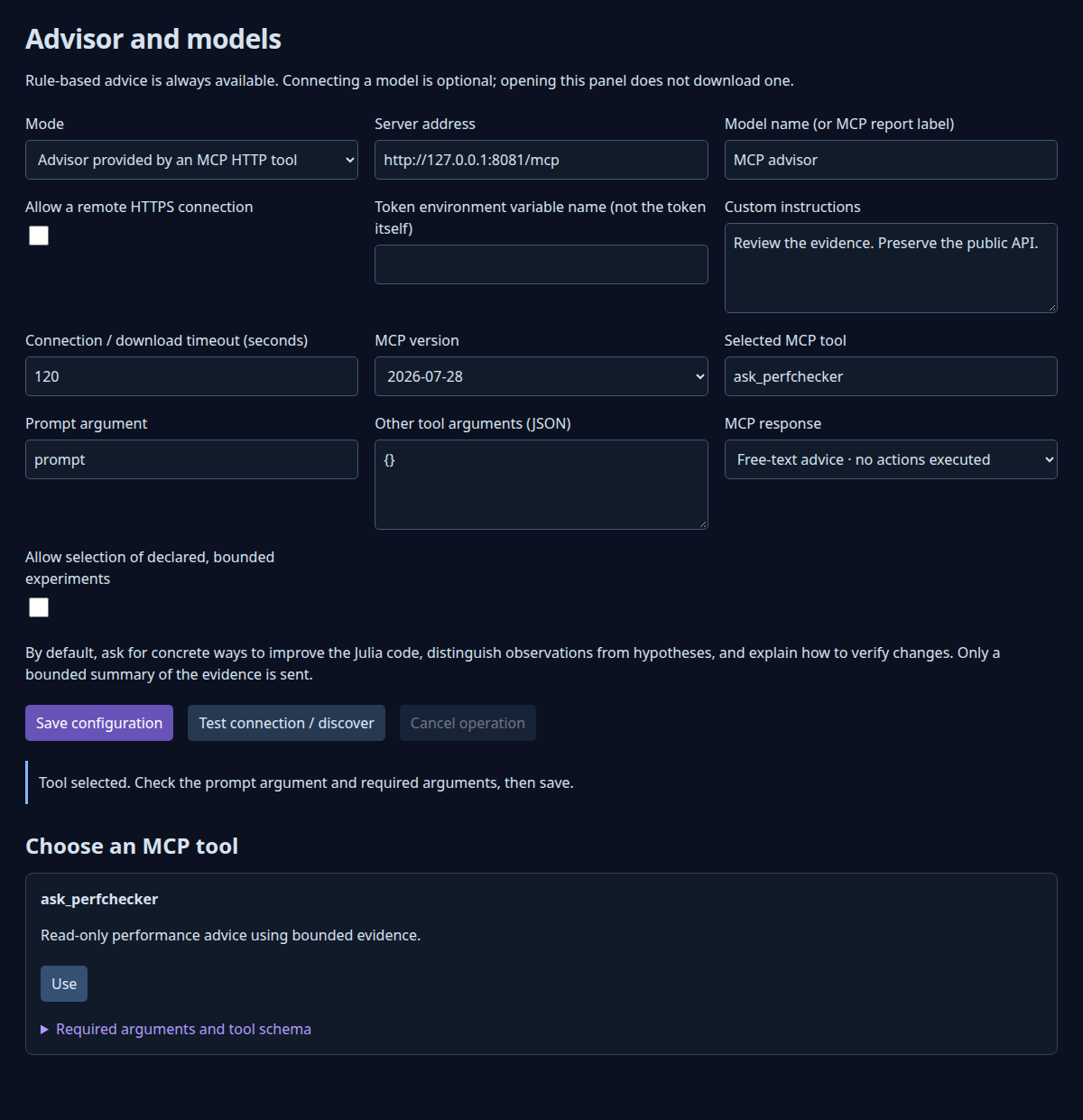
A complete local example for perf/advisor.json is:
{
  "protocol": "mcp_http",
  "endpoint": "http://127.0.0.1:8765/mcp",
  "model": "external-agent",
  "mcp_version": "2026-07-28",
  "mcp_tool": "ask",
  "mcp_prompt_argument": "prompt",
  "mcp_arguments": {},
  "mcp_response": "text",
  "timeout": 90,
  "max_tokens": 512,
  "max_evidence_chars": 12000,
  "instructions": "Explain the evidence and propose checks before changes.",
  "allow_remote": false,
  "api_key_env": ""
}
Replace the address and ask with values from your server. ask is a placeholder, not a standard MCP tool. Set perfchecker.advisorConfig to this file, or leave it empty and use extension settings instead. A configuration file takes precedence over provider settings when the temporary Codex connection is disconnected.
The equivalent essential folder settings are:
{
  "perfchecker.advisorProtocol": "mcp_http",
  "perfchecker.advisorEndpoint": "http://127.0.0.1:8765/mcp",
  "perfchecker.advisorMcpVersion": "2026-07-28",
  "perfchecker.advisorMcpTool": "ask",
  "perfchecker.advisorMcpPromptArgument": "prompt",
  "perfchecker.advisorMcpArguments": {},
  "perfchecker.advisorMcpResponse": "text",
  "perfchecker.advisorInvestigates": false
}
Understand configuration fields
| JSON field | Contract |
|---|---|
protocol | mcp_http for MCP; Chat Completions uses a different adapter |
endpoint | Plain local HTTP(S), or explicitly allowed remote HTTPS; no credentials/query/fragment |
mcp_version | 2026-07-28, or 2025-11-25 for a legacy server |
mcp_tool | One explicitly selected tool; checked with tools/list |
mcp_prompt_argument | String argument receiving instructions and bounded evidence/conversation |
mcp_arguments | Required extra arguments; prompt field is reserved; serialized size at most 12,000 bytes |
mcp_response | text for chat/advice; structured for evidence references and experiment selection |
instructions | Up to 5,000 characters; fixed response and evidence rules are appended |
timeout | Total isolated-worker deadline, including startup and network exchanges |
max_evidence_chars | Evidence projection limit, 1,000–100,000 characters; default 12,000 |
api_key_env | Environment-variable name for an optional Bearer token |
allow_remote | Explicitly permits transmission to a remote HTTPS endpoint |
Tool names and prompt-argument names are checked before the request. Required extra arguments must be configured. max_tokens configures model-provider requests; a generic MCP tool controls its own model limits and cost policy.
For remote servers, use HTTPS and set allow_remote = true. Put the Bearer token in the named environment variable available to VS Code's extension host, never in the JSON or mcp_arguments. OAuth login/refresh is not implemented.
Talk to the advisor
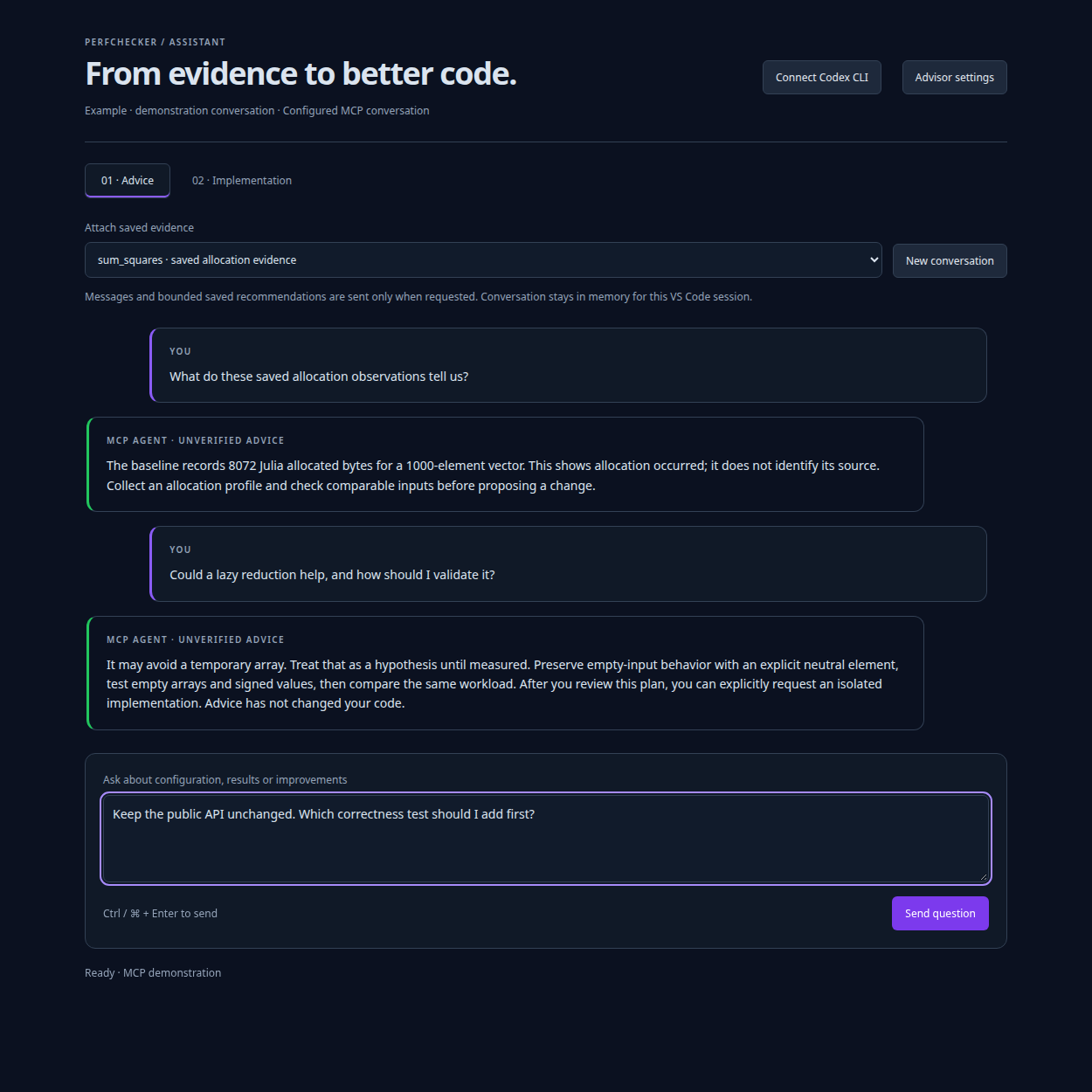
Open PerfChecker: Chat with performance advisor. Select saved deterministic advice if relevant, ask a question, and read the answer in the full editor tab. Follow-up questions include earlier exchanges as bounded context. Changing the selected evidence starts a conversation for that evidence.
The agent receives an instruction to answer in the user's language, distinguish measurements from hypotheses, and provide advice without modifying code or running experiments. When no evidence is selected, it is told no saved measurements were attached. You can still ask how to configure or use PerfChecker.
Replies are unverified text, separate from deterministic findings. Embedded HTML is displayed as text. Suggested commands are not executed by advice chat. You may implement the suggestions yourself.
The public Julia API exposes the same bounded conversation:
using PerfChecker
config = load_advisor_config("perf/advisor.json")
messages = [Dict("role" => "user", "content" => "How should I verify these allocations?")]
result = chat_advice(messages; config,
    advice = read_advice("perf/results/advice.json"))
display(investigation_view(result))
Messages alternate user/assistant and end with a user question: at most 21 messages, 16,000 characters per message, 32,000 total. Replies have at most 16,000 characters. The core API rejects oversized context; the extension can omit older complete exchanges to fit and reports the omission. The core API does not persist a conversation.
Switch from advice to implementation
The explicit Codex connection supplies its two tool names automatically. For an external MCP server, configure the extension's separate implementation fields:
{
  "perfchecker.advisorImplementationMcpTool": "implement",
  "perfchecker.advisorImplementationMcpPromptArgument": "prompt",
  "perfchecker.advisorImplementationMcpWorkspaceArgument": "workspace"
}
implement is also a placeholder. Select a trusted tool that can inspect/edit/test a supplied checkout. Implementation reuses the advice connection, revision, credentials and additional arguments, then substitutes the explicitly configured tool and prompt name. The prompt/workspace argument names must differ; extra arguments cannot override either.
The extension's workflow is:
Get an advice reply and review the proposed change and validation.
Save all editor buffers. Choose Prepare implementation from reviewed advice and read the warning that generated edits may be incorrect.
The I reviewed the advice · Prepare implementation button confirms preparation. PerfChecker records a Git checkpoint of the current on-disk code, including tracked modifications and non-ignored untracked files, then creates an isolated temporary checkout.
The tool receives that checkout's canonical absolute path and an instruction to inspect, edit and test only there. It must leave changes for review and avoid publishing, pushing, deploying or modifying external services.
Read the implementation summary and open the proposed diff. The summary alone does not verify correctness or performance.
Select Apply reviewed implementation changes only after checking the actual diff. Application updates working-tree files without changing HEAD or the real Git index.
Rerun relevant correctness checks, including empty inputs, boundary values and the representative types your API accepts, then collect compatible before/after measurements. A shorter expression can change empty-input or numeric behavior. Use Restore implementation checkpoint if you need to reverse the applied patch and the repository has not drifted.
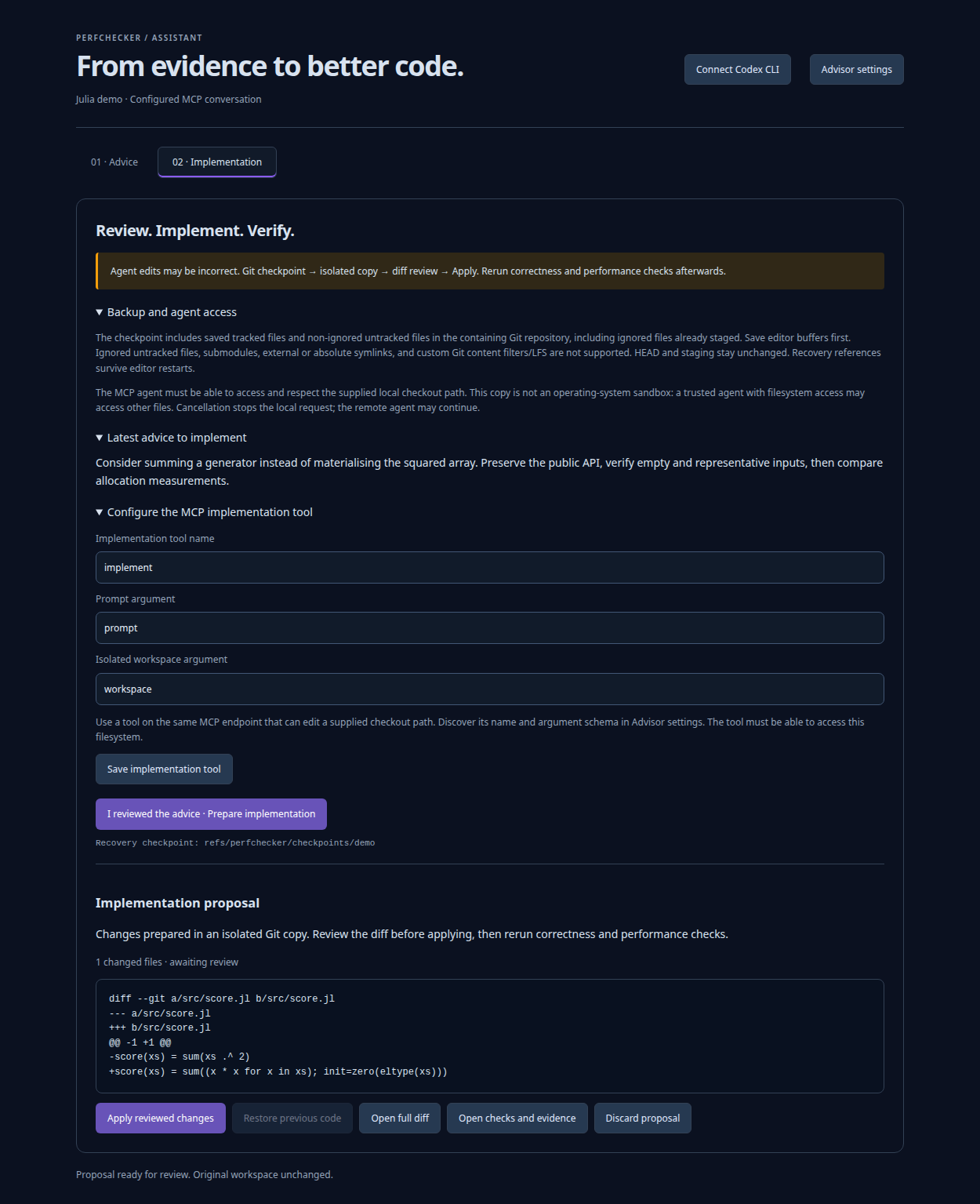
A useful first advice request is: “Explain the allocation observations in this report. Separate measured facts from possible causes and suggest one correctness check before proposing a change.” Before preparing implementation, name the reviewed change and validation you want, for example: “Prepare only the reviewed buffer-reuse change; preserve the public API and validate empty inputs, boundary values and supported numeric types with its correctness tests. Do not claim a speedup without comparable measurements.” Check the diff and worker output yourself. The word complete in a tool reply does not establish that tests passed or that performance improved.
The tool must enforce workspace access
MCP and the prompt do not provide an operating-system sandbox. The selected server/agent must honor the supplied workspace and preferably confine itself independently. A remote HTTPS server does not automatically see local files; it needs a deliberately configured shared filesystem or bridge. Advice mode likewise depends on the chosen tool respecting its advice-only contract.
Preparation requires Git and an existing HEAD commit. Unsupported repositories, unresolved conflicts, submodules, absolute symlinks and symlinks outside the repository are rejected. Ignored untracked files are excluded; ignored files already tracked or force-added to staging are retained. Save editor buffers first; unsaved content cannot be backed up by Git.
V1 also refuses clean/smudge filters (including Git LFS), working-tree-encoding and ident expansion so checkpoint operations cannot invoke transformation drivers. Ordinary CRLF conversion is supported. Use a repository without these attributes for implementation, or apply advice manually.
Checkpoints and recovery
The checkpoint uses a dedicated ref of the form refs/perfchecker/checkpoints/<id>. A reviewed proposal also has a retained Git ref. These preserve the proposal/recovery content independently from its temporary checkout. The original branch and staging are preserved.
The chat displays the checkpoint reference and retains proposal recovery metadata across extension-host reloads. An active per-workspace Git ref also keeps recovery discoverable independently of VS Code storage. Temporary agent workspaces are cleaned up after collection. Git refs remain available for recovery; they are not user commits added to your branch.
Starting a new conversation or changing the attached evidence keeps the current proposal and its restore action. Only Discard proposal explicitly abandons the active proposal pointer; the retained Git refs remain available for manual recovery.
To inspect manually, substitute the exact refs displayed by the extension:
git show <checkpoint-ref>:relative/path.jl
git diff <checkpoint-ref> <proposal-ref>
Use the extension's restore action for the reviewed applied proposal. Apply and restore conservatively refuse when the repository's checkpointed tree has changed, even in a file outside the proposal. Inspect that drift and recover individual content deliberately. The checkpoint contains the on-disk tree; it does not encode an unsaved editor buffer or recreate every historical staging boundary.
Cancellation stops the local client worker. The server may already have changed its isolated checkout or may continue work until it handles the disconnect. Failure/cancellation is not proof that an agent performed no edits. The extension retains the checkpoint but cleans up its temporary checkout after failure/cancellation; it does not necessarily retain a partial proposal for review. No partial change is automatically applied to the original project. A caller of the low-level API owns its workspace lifetime and must inspect it after an interrupted request.
Low-level implementation API
Callers outside the extension must create their own checkpoint and isolated checkout, obtain the user's reviewed implementation request, and implement their own diff review/application/recovery workflow:
implementation_config = AdvisorConfig(
    protocol = :mcp_http, endpoint = "http://127.0.0.1:8765/mcp",
    mcp_tool = "implement", mcp_response = :text)
result = implement_advice(messages; config = implementation_config,
    workspace = isolated_checkout,
    advice = read_advice("perf/results/advice.json"))
implement_advice validates the request and canonicalizes the existing workspace path; it cannot prove that a directory is isolated. It does not create a backup or apply changes. The result has schema perfchecker-narrative/1, advisor_mode = "implementation", and implementation_status = "requires_diff_review", including after a provider failure because a tool might already have made edits. Check status separately. complete means the tool returned a reply, not that its changes are correct.
What is transmitted
Evidence narration sends a bounded projection of recommendation IDs, rules, observations, experiments, verifications and limits. Automatic source-location fields, raw process logs and source files are not included in that projection.
Chat additionally sends your typed messages and retained earlier replies. Anything you paste, including code or paths, therefore becomes part of the request. Implementation additionally sends the isolated checkout's absolute path, and the selected tool can inspect code accessible there. Authentication is sent only in the configured request header. Consider the endpoint's data/cost policy before opting into a remote connection.
The local Codex connector can additionally inspect files in the selected advice workspace or isolated implementation checkout; a bounded evidence projection does not prevent those reads. Text results carry reference_status = "unstructured_not_verified"; individual statements get no invented citations. No API here adopts a performance baseline automatically.
Structured investigations
Structured mode belongs to bounded investigation, rather than free-form implementation chat. The local Codex connection supplies text chat tools. Disconnect it before configuring an external structured tool. To let that assistant select an experiment, use mcp_response = "structured" and enable advisorInvestigates. The tool returns:
{
  "cards": [{"evidence_id": "an exact supplied ID", "explanation": "Supported explanation"}],
  "experiment_id": "stop"
}
Unknown/duplicate evidence IDs and unknown experiment IDs are rejected. Only declared experiments can run; count and duration budgets still apply. Text mode refuses experiment selection. Source edits use the separate explicit implementation workflow.
CLI and automation clients
Create a request JSON containing messages and optional deterministic advice. Implementation additionally requires workspace and can set workspace_argument:
{
  "messages": [{"role": "user", "content": "Explain how to validate an allocation change."}]
}julia --startup-file=no --project=perf/controller -e 'using PerfChecker; exit(perfchecker_main(ARGS))' -- chat --source=perf/chat-request.json --advisor-config=perf/advisor.jsonReplace chat with implement only with an implementation-tool config and a caller-owned isolated checkout in the request. The CLI emits the narrative JSON and exits 0 for a completed reply, 1 for provider failures, cancellation or timeout. POSIX line continuations do not work in PowerShell; these examples use one line.
Compatibility and failures
PerfChecker supports the HTTP subset needed for one explicit tool: JSON and request-scoped SSE replies, paginated discovery (at most 32 pages), legacy initialization/session release, and modern request metadata plus annotated argument headers. Revisions are explicit; no silent downgrade occurs. Responses are capped at 1 MB; redirects and automatic retries are disabled.
See the official 2026-07-28 Streamable HTTP specification and 2025-11-25 transport specification for the server contracts. PerfChecker does not implement stdio, deprecated HTTP+SSE endpoints, sampling, elicitation, roots, subscriptions or arbitrary tool chains.
Troubleshooting
| Result/problem | Next check |
|---|---|
| Provider unavailable | HTTP or the explicit provider package exists in Runner Project |
| Selected tool unavailable | Exact case-sensitive tool name and catalog authorization |
| Additional arguments required | Tool's input schema and mcp_arguments |
| HTTP error | Endpoint, revision, authentication and remote-HTTPS opt-in |
| Unsupported interaction | Choose a tool that finishes without sampling/elicitation/roots |
| Reply rejected | Nonempty text at most 16,000 characters; valid structured IDs if structured |
| Timeout | Increase explicit deadline if needed; it includes Julia startup |
| Cancellation | Local worker stopped; server interruption depends on the server |
| Apply/restore refused | Repository drifted; inspect before recovering content |
| Git transformation unsupported | Check attributes for filters/LFS, working-tree encoding or ident expansion |
| Codex executable unsupported | Native binary with the required flags; qualified version 0.159.2 |
| Codex not authenticated | Run codex login yourself, then reconnect |
Project .codex configuration refused | Use a clean workspace or your explicitly configured external MCP agent |
| Codex disconnected after reload | Connect again; saved provider settings and Git recovery are retained |
Unsupported interactions, malformed responses and tool errors retain the deterministic fallback. A failed optional advisor does not change measured verdicts.